浏览量 107
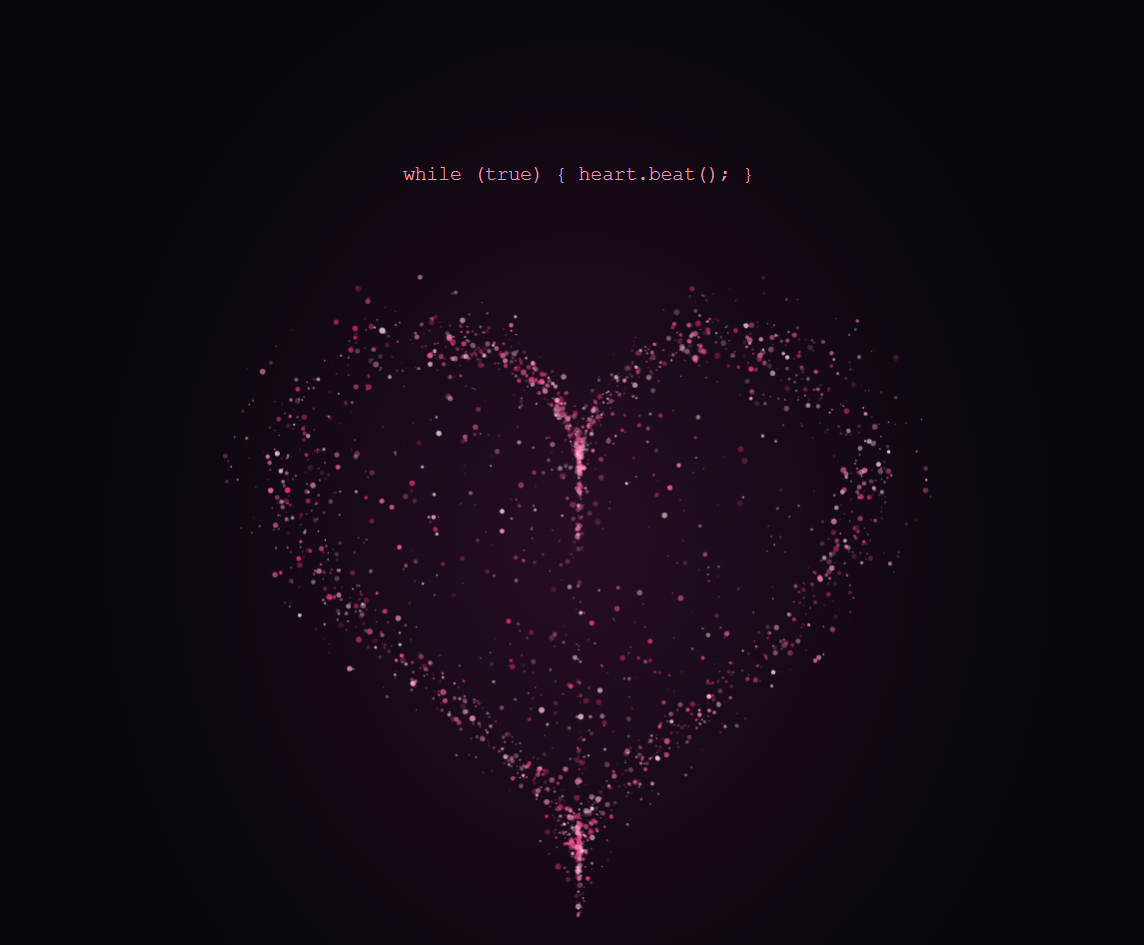
用 Canvas 做了一颗李峋风格的粒子爱心。粉色粒子在深色画布上聚拢,随着心跳微微向外扩张。点一下爱心,粒子会散开再回到原位。
爱心是怎么画出来的
先用参数方程算出爱心轮廓,再在轮廓内外随机分布粒子。爱心默认边跳边转。透视投影让粒子绕竖轴转动,近处的粒子也会更亮。点击「暂停旋转」可以停在当前角度,爱心会继续跳动。每一帧根据同一个心跳节奏更新粒子的位置,各自的透明度则独立变化。
完整源码
把代码保存为 UTF-8 编码的 HTML 文件,双击即可离线运行。
背景里的代码缓慢滚动,和玫红色代码雨叠在一起。爱心由 3600 个粒子组成。鼠标左右移动时,爱心会跟着转向。
<!doctype html>
<html lang="zh-CN">
<head>
<meta charset="utf-8">
<meta name="viewport" content="width=device-width, initial-scale=1">
<meta name="theme-color" content="#08060c">
<title>把心跳写进代码里</title>
<style>
*{box-sizing:border-box}
body{margin:0;background:#08060c;color:#f9e5ef;font-family:"Microsoft YaHei",system-ui,sans-serif}
main{position:relative;isolation:isolate;min-height:100svh;display:grid;place-content:center;justify-items:center;text-align:center;padding:24px;background:radial-gradient(ellipse at 50% 43%,#270e22 0%,transparent 57%)}
pre{margin:0;color:#e396b6;font:clamp(10px,3vw,13px)/1.6 "Courier New",monospace}
.stage{position:relative;width:min(540px,90vw,61svh);aspect-ratio:1;border:0;padding:0;background:none;cursor:pointer;border-radius:24px}
.stage:focus-visible{outline:1px solid #ff8fbd;outline-offset:3px}
.rain{position:absolute;inset:0;z-index:-1}.stage canvas,.rain{display:block;width:100%;height:100%;pointer-events:none}
h1{font-size:clamp(22px,5vw,38px);font-weight:500;letter-spacing:.12em;margin:0}
.rotate{margin-top:16px;border:1px solid #793653;border-radius:999px;padding:8px 15px;background:#1a0a16;color:#ffe0ed;cursor:pointer}.rotate[aria-pressed=true]{background:#642041;box-shadow:0 0 18px #fa4c8f55}
p{margin:16px 0 0;color:#de9fbb;font-size:12px;letter-spacing:.16em}
</style>
</head>
<body>
<main><canvas class="rain" aria-hidden="true"></canvas>
<pre aria-hidden="true">while (true) { heart.beat(); }</pre>
<button class="stage" type="button" aria-label="点亮爱心"><canvas aria-hidden="true"></canvas></button>
<h1>把心跳写进代码里</h1>
<p>点击爱心,让它为你跳一下</p>
<button class="rotate" type="button" aria-pressed="true">暂停旋转</button>
</main>
<script>
const stage = document.querySelector('.stage');
const rotate = document.querySelector('.rotate');
const canvas = stage.querySelector('canvas');
const rain = document.querySelector('.rain');
const rainContext = rain.getContext('2d');
let pointerYaw = 0, pointerTarget = 0;
const ctx = canvas.getContext('2d');
const reducedMotion = matchMedia('(prefers-reduced-motion: reduce)');
let size, scale, pulseAt = -Infinity, animation;
const start = performance.now(); let rotating = !reducedMotion.matches, yaw = 0, lastFrame = start;
const colors = ['#ff347e','#ff65a1','#ff9bc5','#ffd1e6'];
const points = Array.from({length: 3600}, (_, i) => {
  const angle = Math.random() * Math.PI * 2;
  const radius = i < 2100 ? .85 + Math.random() * .18 : Math.sqrt(Math.random()) * 1.18;
  const s = Math.sin(angle), c = Math.cos(angle);
  return {
    x: 16 * s ** 3 * radius / 42,
    y: -(13 * c - 5 * Math.cos(2*angle) - 2 * Math.cos(3*angle) - Math.cos(4*angle) + 2) * radius / 42,
    depth: (Math.random() - .5) * .22,
    phase: Math.random() * 6.28,
    opacity: .2 + Math.random() * .72,
    radius: .35 + Math.random() ** 2 * 1.65,
    color: colors[Math.floor(Math.random() * colors.length)]
  };
});
const backdropLines = [
  ['const', ' pulse = Math.sin(time * 4.8);'],
  ['let', ' angle = origin + pointer.x;'],
  ['for', ' (const point of particles) {'],
  ['  const', ' light = point.phase + time;'],
  ['  ctx', '.globalAlpha = flicker(light);'],
  ['  ctx', '.fillStyle = point.color;'],
  ['  draw', '(project(point, angle));'],
  ['}', ''],
  ['requestAnimationFrame', '(render);']
];
function drawCodeBackdrop(context, w, h, seconds) {
  const row = 21;
  const scroll = seconds * 12;
  const first = Math.floor(scroll / row);
  context.save();
  context.font = '13px Consolas, monospace';
  context.textBaseline = 'top';
  for (let x = 22; x < w; x += 360) {
    const middle = Math.max(0, 1 - Math.abs(x + 145 - w / 2) / Math.max(170, w / 2));
    context.globalAlpha = .23 - .10 * middle;
    for (let line = 0; line <= h / row + 1; line++) {
      const index = first + line + Math.floor(x / 360) * 3;
      const [keyword, source] = backdropLines[index % backdropLines.length];
      const y = line * row - scroll % row;
      context.fillStyle = '#9a5d85';
      context.fillText(String(index % 100).padStart(2, '0'), x, y);
      context.fillStyle = '#dc8cbc';
      context.fillText(keyword, x + 30, y);
      context.fillStyle = '#a3a0c3';
      context.fillText(source, x + 30 + context.measureText(keyword).width, y);
    }
  }
  context.restore();
}

function drawCodeRain(context, w, h, seconds) {
  const spacing = w < 600 ? 24 : 30;
  const row = 15;
  context.save();
  context.font = '12px Consolas, monospace';
  context.textBaseline = 'top';
  for (let col = 0; col * spacing < w; col++) {
    const speed = 28 + (col * 37 % 66);
    const distance = (seconds * speed + col * 137) % (h + 210);
    const head = Math.floor(distance / row) * row;
    const x = col * spacing + 5;
    for (let tail = 0; tail < 12; tail++) {
      const y = head - tail * row;
      if (y < 0 || y >= h) continue;
      const code = (col * 19 + Math.floor((y - seconds * speed) / row) * 13) >>> 0;
      const alpha = (1 - tail / 12) ** 2 * (tail === 0 ? .62 : .32);
      context.fillStyle = tail === 0 ? '#ffc1dc' : '#b94d87';
      context.globalAlpha = alpha;
      context.fillText(['0', '1', '1', '0', '+', '·', '0'][code % 7], x, y);
    }
  }
  context.restore();
}

function draw(now) {
  const still = reducedMotion.matches;
  const time = still ? 2 : (now - start) / 1000;
  if (rotating) yaw += Math.max(0, Math.min(50, now - lastFrame)) * .0014;
  lastFrame = now;
  pointerYaw += (pointerTarget - pointerYaw) * .12;
  const angle = yaw + (still ? pointerTarget : pointerYaw);
  const cos = Math.cos(angle), sin = Math.sin(angle);
  rainContext.clearRect(0, 0, rain.width, rain.height);
  drawCodeBackdrop(rainContext, rain.width, rain.height, time);
  drawCodeRain(rainContext, rain.width, rain.height, time);
  const age = Math.max(0, (now - pulseAt) / 1000);
  const burst = age < 1 ? Math.sin(Math.PI * age) * (1-age) : 0;
  const beat = Math.max(0, Math.sin(time * 4.8)) ** 7;
  const gather = Math.exp(-3 * time);
  ctx.setTransform(scale, 0, 0, scale, 0, 0);
  ctx.clearRect(0, 0, size, size);
  for (const point of points) {
    const expansion = 1 + .065 * beat + (still ? 0 : .38 * burst);
    const drift = .004 * Math.sin(time * 2 + point.phase) + gather * .2;
    const z = point.depth * cos - point.x * sin;
    const perspective = 1 / (1 - z * .58);
    const x = size * (.5 + (point.x * cos + point.depth * sin) * expansion * perspective + drift * Math.cos(point.phase));
    const y = size * (.5 + point.y * expansion * perspective + drift * Math.sin(point.phase));
    ctx.globalAlpha = Math.max(0, Math.min(1, point.opacity * (.82 + .18 * Math.sin(time * 2 + point.phase)) + burst + z * .36));
    ctx.fillStyle = point.color;
    ctx.beginPath();
    ctx.arc(x, y, point.radius * Math.min(1, size / 420), 0, 2 * Math.PI);
    ctx.fill();
  }
  animation = still && !rotating && age >= 1 ? undefined : requestAnimationFrame(draw);
}
function render() {
  cancelAnimationFrame(animation);
  draw(performance.now());
}
new ResizeObserver(() => {
  size = canvas.clientWidth;
  rain.width = rain.clientWidth;
  rain.height = rain.clientHeight;
  scale = Math.min(devicePixelRatio || 1, 2);
  canvas.width = canvas.height = Math.round(size * scale);
  render();
}).observe(canvas);
reducedMotion.addEventListener('change', render);
document.querySelector('main').addEventListener('pointermove', event => {
  if (event.pointerType === 'touch') return;
  pointerTarget = (event.clientX / Math.max(1, rain.clientWidth) - .5) * 2;
  if (reducedMotion.matches && !rotating) render();
});
document.querySelector('main').addEventListener('pointerleave', () => {
  pointerTarget = 0;
  if (reducedMotion.matches && !rotating) render();
});
stage.addEventListener('click', () => {
  pulseAt = performance.now();
  render();
});
function updateRotationButton() {
  rotate.setAttribute('aria-pressed', String(rotating));
  rotate.textContent = rotating ? '暂停旋转' : '旋转爱心';
}
updateRotationButton();
rotate.addEventListener('click', () => {
  rotating = !rotating;
  if (rotating) lastFrame = performance.now();
  rotate.setAttribute('aria-pressed', String(rotating));
  rotate.textContent = rotating ? '暂停旋转' : '旋转爱心';
  render();
});
</script>
</body>
</html>